Showing posts with label mask. Show all posts

Thursday, 10 November 2016

Aku Aku Mask-Crash Bandicoot


Following on from my last build I decided to keep practicing more with using EVA foam as a prop making material, I was commissioned to make a replica of Aku Aku, a character from the game franchise Crash Bandicoot.


After drawing up templates the shapes were transferred to EVA Foam and cut out, the pieces were then rounded and smoothed using a dremel with a sanding drum attachment and then finished off with 400 grit sandpaper.


The next step was adding the wood grain texture to the pieces, I drew out a basic texture using a black rollerball pen so that I didn't indent the foam and could draw with a nice thin line unlike a sharpie. The lines were lightly scored using a scalpel and then hit with a heat gun to open them up. For they eyes I made clear plastic copies using worbla's transpa art.


At this point the foam was sealed with 4  thin coats of white plastidip, using white left me with a good base for the colours and once the white was dry I masked off the facial features so they could be painted.  


I used a few different paints for the colours on the mask, I used red plastidip for the brows, nose and lips. The eye bags were painted by hand using acrylic and the wood was painted using spraypaint. I wanted to use a variety to see how they worked with foam (this was tested on scraps first!) The spray paint was flexible but not to the same degree as the acrylic, it worked fine for this project but if I were to paint something that would be being flexed repeatedly I would opt to use a latex paint. 


The eyes were painted on the inside using acrylics, I gradiated from red to yellow to give a warm glow, this was done by stippling the colours inside to give a rougher finish as airbrushing the colours I felt would have looked too clean and perfect for the characters appearance. 


The final step was detailing, using acrylic washes I built up grime to seep into the grain of the pieces and dull the bright colours down a little to make him a little more realistic. Light dry brushing was applied in certain areas to bring the colour back through, at this point the eye lenses were attached along with the feathers and his goatee which was made from an artificial leaf.

Monday, 31 October 2016

Suicide Squad Sharkhead Thug


I was commissioned to replicate one of the masks worn by the thugs accompanying joker in the Suicide Squad film, the helmet is fairly basic in shape and design so rather than sculpt anything and make hard copies I created the shapes using foam instead.


I created a foam helmet pattern almost the same as a motorbike helmet in shape, once I was happy with the pattern I cut the pieces out of EVA foam and used contact adhesive to attach them together, The seams needed to be nice and flush on this helmet as it was going to be covered in fabric and any raised seams would show through the fabric covering. The raised seams were given a light pass over using the sanding drum on my dremel and then smoothed further with 240 grit sandpaper. 


I pinned a piece of 4 way stretch material to one side of the helmet to draft all the shapes and placements for the eye holes, my final fabric was going to be a 4 way stretch material so I needed to pattern with a similar material to make sure it would lay the same way in the final fabric, once I was happy with the placements these pieces were transferred to pattern paper for the fabric and a thin card for the pieces that needed to be cut out using a blade.


I created a card template to make sure the vision holes would all line up correctly, unlike tougher materials such as leather stretch fabrics move and flex with the force of hole punch pliers, so to make the holes in this I used a hollow punch tool and mallet with a piece of scrap leather underneath to get a clean cut in the fabric.


The fabric cover was next stitched together and then the seam was splayed open and tacked down at the ends and in a few other spots to keep the seam flat for a smoother appearance. I used contact adhesive to bond the centre seam of the fabric to the helmet, I started from the lip under the chin and worked my way along a couple of inches at a time. I pinned the glued fabric to the foam along the seam allowance to keep it in place as I went, keeping the seam of the fabric in line with the seam of the foam so that I knew it was maintaining a straight line.

Once the glue had dried I applied a thin layer (thin enough so that it doesn't seep through the fabric and leave a mark) of glue to the area of the fabric where the vision holes were punched and secured them down doing one side then the other, by only putting glue on the fabric rather than both the foam and fabric the glue doesn't grab the material as it is meant to immediately so there is time to shift the fabric where needed to make sure both sides are lined up, once that had dried I worked my way along the lip gluing under the helmet doing one side from front to back and then the other side. Working with stretch material if you pull and stretch the material too much and go around in a circular motion when you get to the end you can end up with bunched up excess material because it has been stretched too much, doing one side at a time you can make sure the fabric is stretched evenly.


Once all the glue had fully dried I drilled the holes through the foam using the pre-punched holes in the fabric as guides, this is why the holes were fixed down with glue, so that they stay lined up with the holes in the foam. I used my dremel with a diamond ball burr bit to drill through the foam as they gave a cleaner cut than a standard drill bit. The dremel speed was set at 20 RPM, any slower resulted in a rough hole and any faster was hard to maintain good control. Vision was... okay, it was hard to see things close up but better from a distance so walking was fine, just don't try read with it on haha. After this padding was added to the interior to fit the client.


The final piece of the mask was the shark teeth, these were cut from a large A3 sheet of craft foam, this larger sheet was thicker than the smaller A4 sheets of craft foam which added a little more strength and dimension to the teeth as they stood out straight rather than flopping down onto the surface of the helmet similar to the original helmet. As the mouth is white I sealed the teeth with a few layers of white plastidip to make it easier to maintain a clean white finish. The teeth where then adhered in place onto the helmet and it was finished!


Thursday, 15 May 2014

3D printed plague mask


This was a Uni project and was designed as a modern interpretation of a plague mask. We had to make objects in only white or cream and had to make the piece more interesting using design and texture. I designed my mask in a 3D program called blender, to create a more interesting look for the mask I decide to make the face faceted to give me lots of different shades of the same colour. I achieved this by making my model low poly using the decimate tool in blender.


I imported my model into pepakura and then built a card version to make sure the model was scaled to fit my face, once I was happy with the scale it was sent off to the 3D printers.


The surface of a 3D print is quite rough and porous which needed to be fixed before painting. To smooth and seal the mask I used spot filling putty and filler primer. These were used to build up the surface to make it smooth as sanding away the plastic would get rid of the sharp facets that were part of the design. The mask was wet sanded with 600 grit up to 1500 grit.


To add more surface detail I opted to give the piece a crazed porcelain texture. I achieved this by using a 2 part spray paint, first a gold base layer is applied quite thickly in one coat and left to become tacky, then an off white top layer is lightly sprayed over the top. The two paints have a different chemical base and interact with each other creating a cracked appearance. The piece was then given two coats of satin clear coat to protect the finish and was done!

Saturday, 8 June 2013

Guy Manuel - Random Access Memories


After building both of Daft Punk's helmets last year I learnt an awful lot, they were my first large scale project and with them came a whole array of new techniques and materials I hadn't used before. After looking back on them now after learning all these processes I felt I could do a much better job on these helmets and with the new album came the new helmet design for Guy Manuel giving me an opportunity to begin again.


Research and pre planning was something that needed to be built upon vastly compared to the last time I attempted this so I scoured the internet for reference photos and built up a small library. I was able to use the different shots I found to create technical drawings in Illustrator. I overlayed my work onto multiple photos of Guy's helmet until it matched well in all the profile and front on shots I had and I was confident it was accurate. 


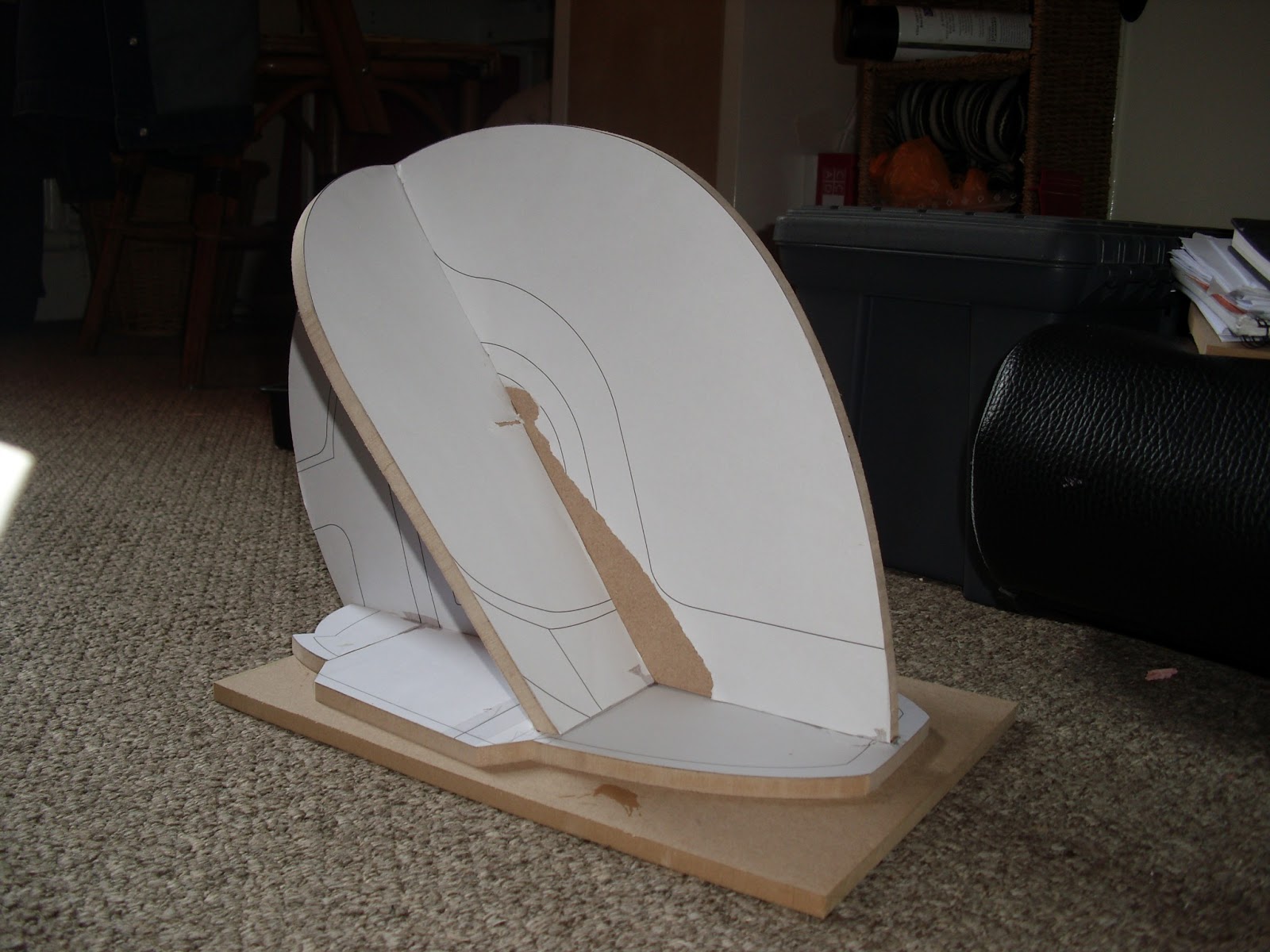
To test scaling I first printed the design onto card, luckily I had scaled it to the correct height on first go... I think. So I was ready to transfer the plans to MDF.


The pieces were all slotted together and held together from the tight joins so glue wasn't really necessary, but I tacked a few of the joins with superglue to make sure nothing shifted whilst I worked on it.


Blocks of carving foam were glued onto the MDF and shaped with a rasp and sandpaper to get the rough overall shape. Once that was done the foam was sealed using resin before I added the first skim of Body Filler.


A mounting point for the ear detail was made using more filler and an MDF form, I used this as a reference point for the curvature of the rest of the helmet, here you can see the back almost finished and how the front needs building out to match the ear base.


The main form is now finished and the placement for the raised detail has been sketched onto the surface with the aid of paper templates created from my vector blueprint, they can be seen a little clearer if you enlarge the photo. Some of the jaw area was left unfinished at the bottom as this will be covered by the raised detail .


After sampling a few ideas I did a few material tests to find a way to attach my guides strongly but temporarily so that they could be removed without leaving marks all over the nice pretty dome. A painters tape I had was easy to peel off without leaving a mark so I used that as a base to attach the plastic guides. 


The guides were made to the correct curvature by using a tile shaping tool I re purposed as a curve guide, I simply placed it on top of the pencil guides and then drew round the curve it created onto the plastic sheet.


Once the guides were in place all I had to do was fill them with filler, I decided to do this in two sections so I will work on the front half first, then make guides for the back half so that I can focus on one area at a time.


The front of the helmet has taken shape now and the back form has been roughed in.


The back half has now been filled and smoothed, my templates were used to make sure each side was symmetrical and the next stage will be to engrave the lines around the back dome.


The engraved detail in the back section of the helmet was first drawn out in pencil and then templates were made using a few scraps of plastic, the plastic templates were temporarily taped to the surface to stop them from shifting whilst I used a scribing tool to mark the lines in the surface, these shallow lines were then deepened using a miniature file. Using plastic templates helped give me get a level and symmetrical line straight away.


The back section was bevelled with a small tool made from styrene and the last of the engraved detail was then added to the sides.


After checking my reference photos I realised that I had made the bottom edges of the raised detail too thick and thinned them down to the same width as the rest of the raised detail.


The next piece I made was the neck guard, the shape was cut out of styrene and a spacer was added to the edge to give the right depth. I then taped the edges down to create a hinge, the plastic piece was covered in filler and then squashed down and the excess filler was scraped away.


Sanded smooth.


I created a 3D file and technical drawing of the ear pucks as I don't own my own lathe so I will need to outsource for this part of the build.


The ear surrounds were the next piece to be made, I laminated pieces of MDF together to the required thickness and cut the shape out on a bandsaw. The recessed area was drawn out and holes were drilled for the jigsaw to cut through.


Before cutting out the front I used a router to recess the back of the surround to create the insert for the circuitboard detail.


A holesaw was used to cut out the curved top, luckily the local hardware shop had one the exact size I needed ! after that the centre was cut out using a jigsaw.


Outer edge was then angled using a chamfer bit and router.


I laser cut my circuit board patterns out of 2 mm acrylic and glued them inside the ear surrounds, I then backfilled the inside with filler to strengthen the pieces ready for vac-forming. Now I can start spot filling whilst I wait for the plastic for the vac former to arrive.


The ear surrounds are now attached to the helmet and the details have been finished, now I can prepare my moulding supplies whilst I wait for my ear pucks to be delivered.


The ear pucks came in and I got a few coats of primer on them and wetsanded them smooth.


The helmet has been given its coats of primer with a light sand in between coats ready to be wet sanded once the last coat is fully hardened.


The ear pieces have been attached and the whole helmet has been wetsanded from 600 grit up to 1500 grit to get it nice and smooth ready for moulding.


Using a block of foam I laminated two pieces together to create a platform for the helmet to sit on and allow enough space to get to the detail underneath. A skirt was added to the bottom of the helmet from styrene sheet to make the resin casts easier to finish.


Print coat


After another layer of normal silicone the first thickened layer was applied.


After another few layers the registration keys were applied all over to make sure the silicone mould would lock into the fibreglass mother mould.


The Mother mould frames were made from MDF and the Mother mould was made using a layer of fibreglass tissue to catch the detail and then a few layers of fibreglass Matt to build up wall strength.


The skirting worked well and created a neat overspill for the resin making trimming the casts straight forward.


The mould came out great ! The engraved lines and circuit-board detail came out nice and sharp. The mould is now ready for its first casting.


Nervously watching as the final layer cures....


Aaaaand the first cast ! other than a few dinks in the visor area (which will be removed anyway) the cast came out really well and after learning from the first use of the mould I think the next cast will come out better.


And here's a spiffy looking chap modelling my helmet cast to check fit and scale, looking pretty good I think !